OCR Spanish: searchable PDFs with accents and ñ
Turn Spanish scans into searchable PDFs on your own PC. Inklight keeps á, é, ñ and ü, knows Spanish words and outlines the ones it doubts.
Published
In Spanish, one dropped tilde changes the word: año (year) read as ano is a different word, and a search for “año 2024” no longer finds the page. Inklight reads Spanish scans on your own Windows or Linux PC and writes a searchable PDF beside each one. Spanish is one of the six languages its recognition is tested on, and a Spanish word list ships with the app. Inklight outlines the words it is unsure about, and you check them.
How it works in Inklight
Drop the scans or PDFs on the Processing Queue, or scan straight from your scanner. Each file becomes a Job. Inklight recognizes it in the background and writes {name}_ocr.pdf next to the original. You do not pick a language. Inklight reads each document against the word lists of the languages it finds on the page, up to two, so a Spanish invoice with English terms needs no setting.
When a file is done, its card says how many words are left to check. Click Check words to step through them. No word list catches ano, because it is a real word. The second recognition model does. When the two models read a word differently, both readings appear and you press 1 or 2:
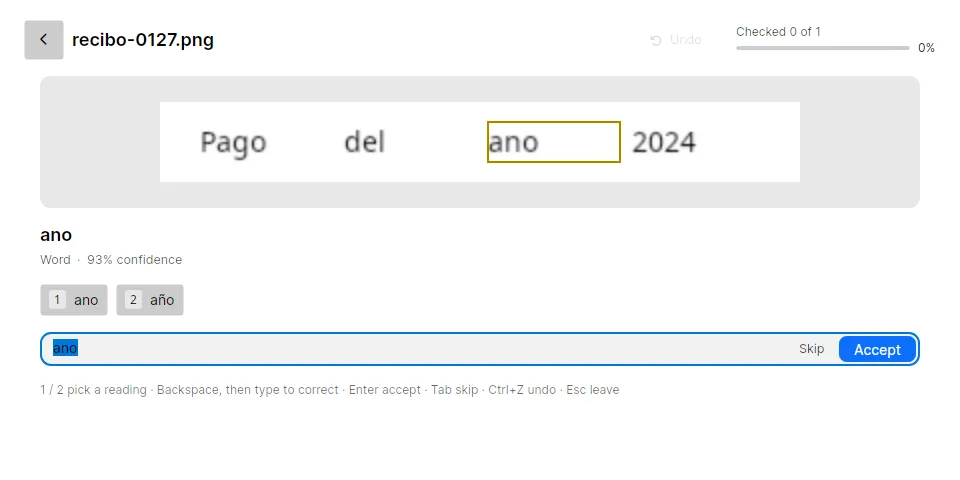
Enter accepts a word, typing replaces it, Tab skips it. Inklight writes every decision into the searchable PDF’s text layer straight away.
The Check pass also groups the same word across files. If ano turns up on three pages of two invoices, you see it once, marked “×3 in 2 documents”, with the line of each other copy below it. One decision writes año into every copy whose box stays ticked. Clear a box to decide that copy on its own.
What you get
- Searchable PDFs from Spanish scans, PDFs and photos, made on your machine. Nothing is uploaded. Every plan.
- Accents, ñ and ü kept in the text layer as read, so search and copy work with the real spelling.
- Spanish PDFs that already have text on every page are left alone. In a PDF where only some pages have text, Inklight recognizes the others and keeps the rest of the file. Every plan.
- The shipped Spanish word list, used to decide which uncertain words need a look. Every plan.
- IBAN check, Spanish IBANs included: one whose checksum fails is the first word the Check pass shows. Every plan.
- Clean pages without the footer. Free writes a small footer on every page; Personal and Business do not.
- The command line, for converting files from scripts:
inklight scan.pdf scan_ocr.pdf. Business.
Limits
- Inklight reads printed Latin-script text. Handwriting is not read.
- The six tested languages are English, German, French, Spanish, Italian and Dutch.
- Word lists ship for 13 languages, Spanish, Portuguese and Italian among them. Catalan, Galician and Basque have none, so in those passages no list can clear an uncertain word and more words go to the Check pass.
- Only words the Check pass flags are outlined. A word misread with high confidence by both models is not, so compare amounts and names you rely on with the scan. Check and fix OCR errors shows how.
- Windows and Linux only. There is no macOS version.
More guides
- OCR German: umlauts and ß
- OCR French: accents and œ
- ABBYY FineReader alternative: buy once, run on Linux
Get started
Download Inklight for Windows or Linux. Every install starts with a seven-day Business trial; see the plans for what stays free.