Skip to content

Searchable PDFs from scans & images,done offline.

Drop scans and PDFs, get searchable PDFs back, privately your own device. For Windows and Linux.

  • Local by defaultYour documents never leave your machine.
  • Honest about doubtUncertain words are outlined, not hidden.
  • Windows + LinuxBuilt for your desktop.

Check only what deserves a second look.

Inklight outlines the words it is unsure about, worst first: a failing IBAN checksum, a number, a word two readers disagreed on. Confirm or correct each one with a keystroke; the searchable PDF is rewritten with your decisions.

Free
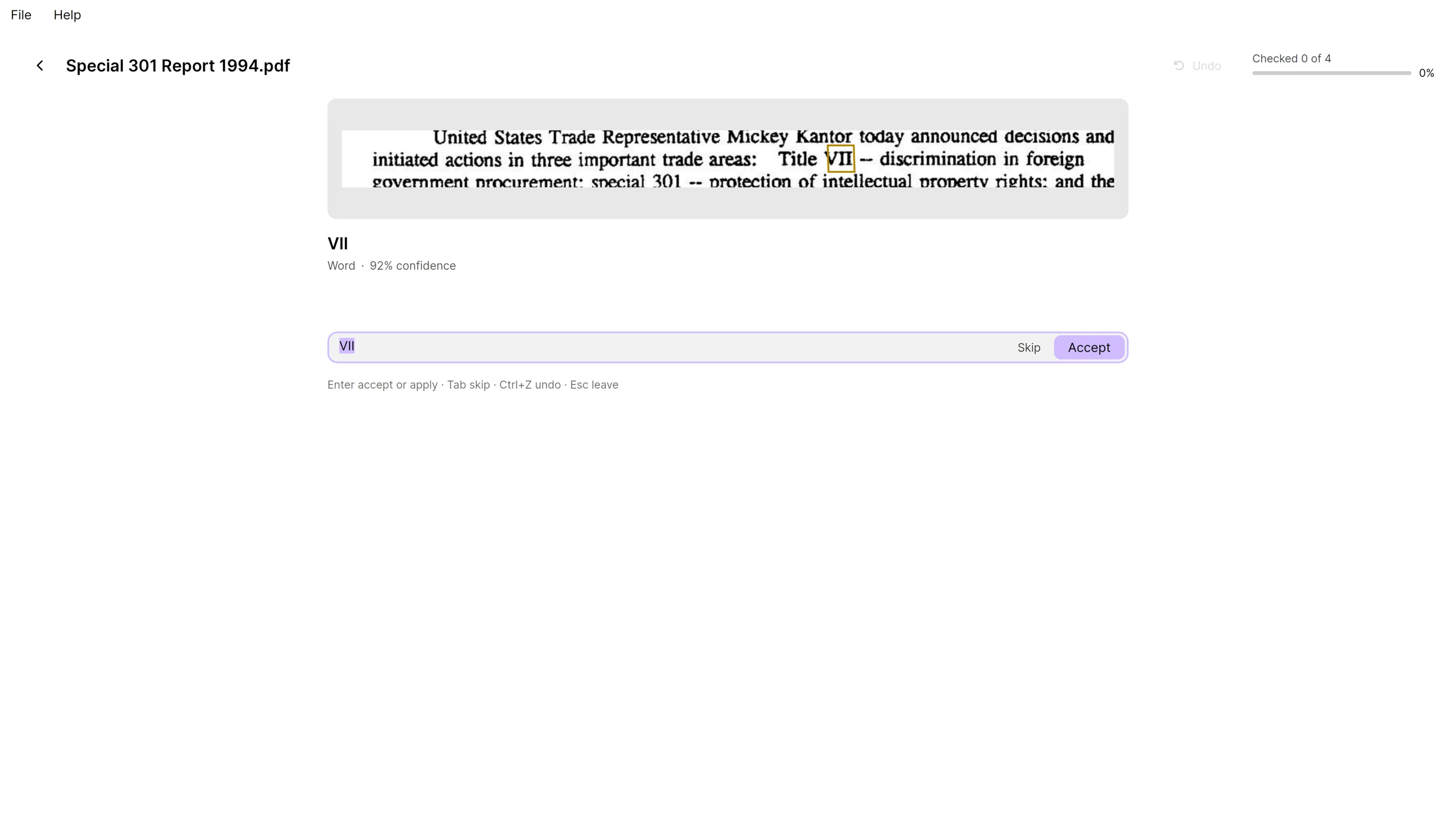
The Check pass showing the line around an uncertain word cut from the scan, the word “VII” with its confidence, and a text box ready for a correction; the header counts checked 0 of 4.

Drop a folder. Get searchable PDFs back.

Free

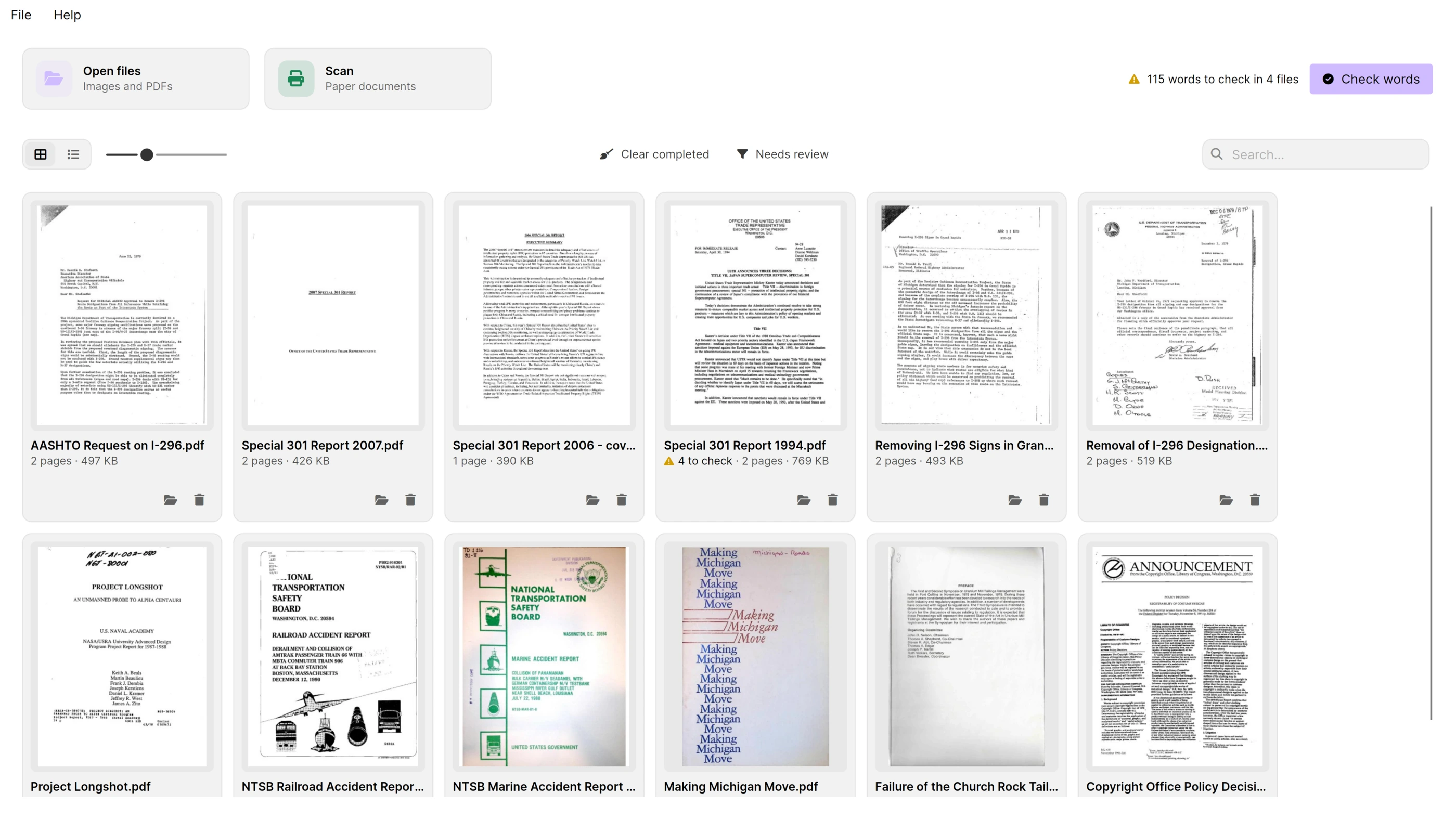
Every file you drop becomes a Job that is recognized in the background, one after the other. Cards show each page's thumbnail, the page count and how many words are left to check.

The Processing Queue showing twelve scanned documents as cards with page thumbnails; one card reads “4 to check”, and the header counts 115 words to check in 4 files beside a Check words button.
  • PDF
  • TIFF
  • PNG
  • JPEG
  • WebP
  • BMP
  • GIF
  • HEIC
  • AVIF
  • JPEG XL

Read the page as it was scanned.

Free

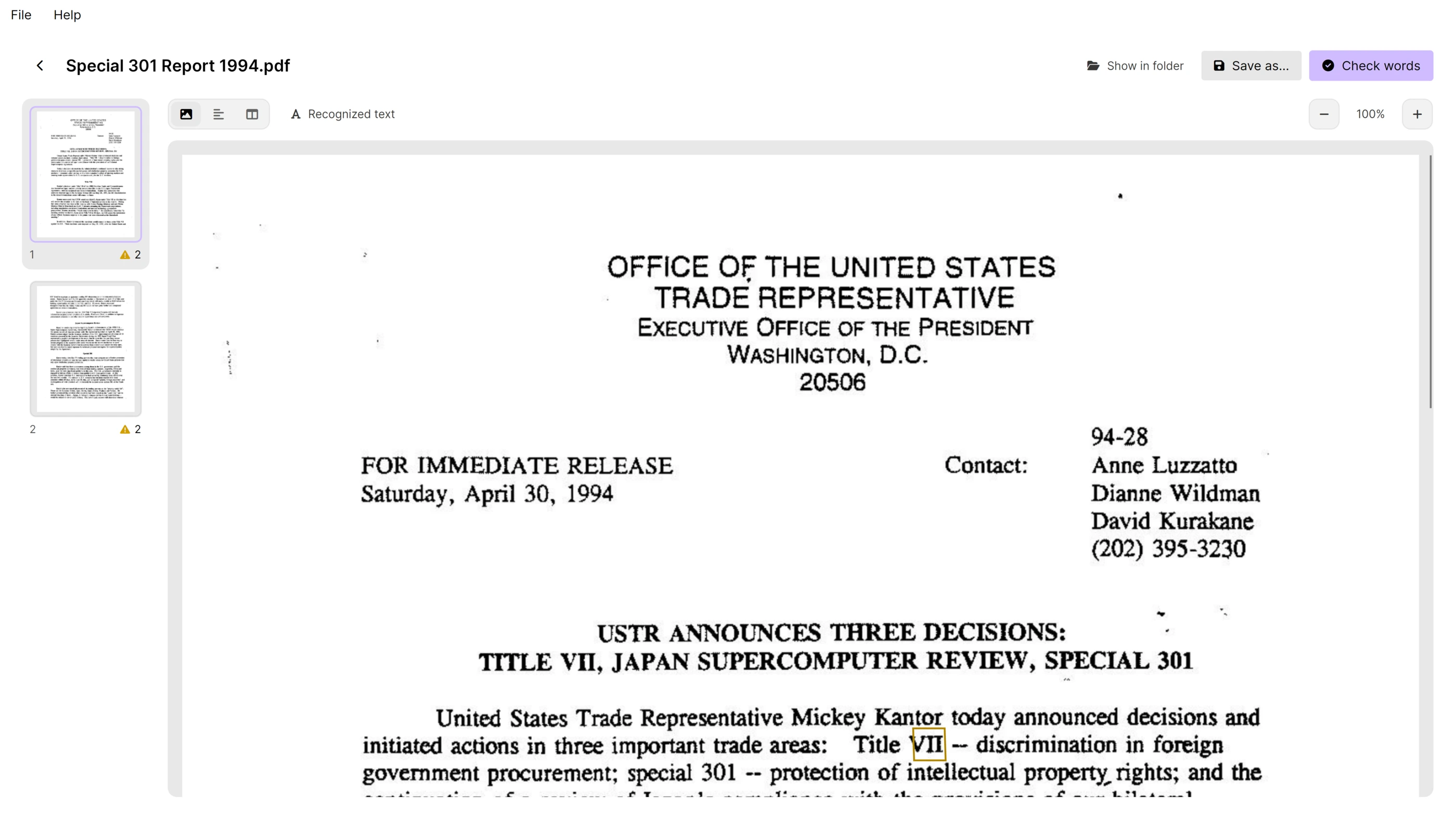
Open a document to see each page with its recognized words. Click a word to correct it in place, or find and replace across the page. Every correction lands in the searchable PDF.

A recognized page of a 1994 press release shown at full width with its uncertain words outlined; the page strip at the left lists both pages with their check counts.

Scan and text, side by side.

Free

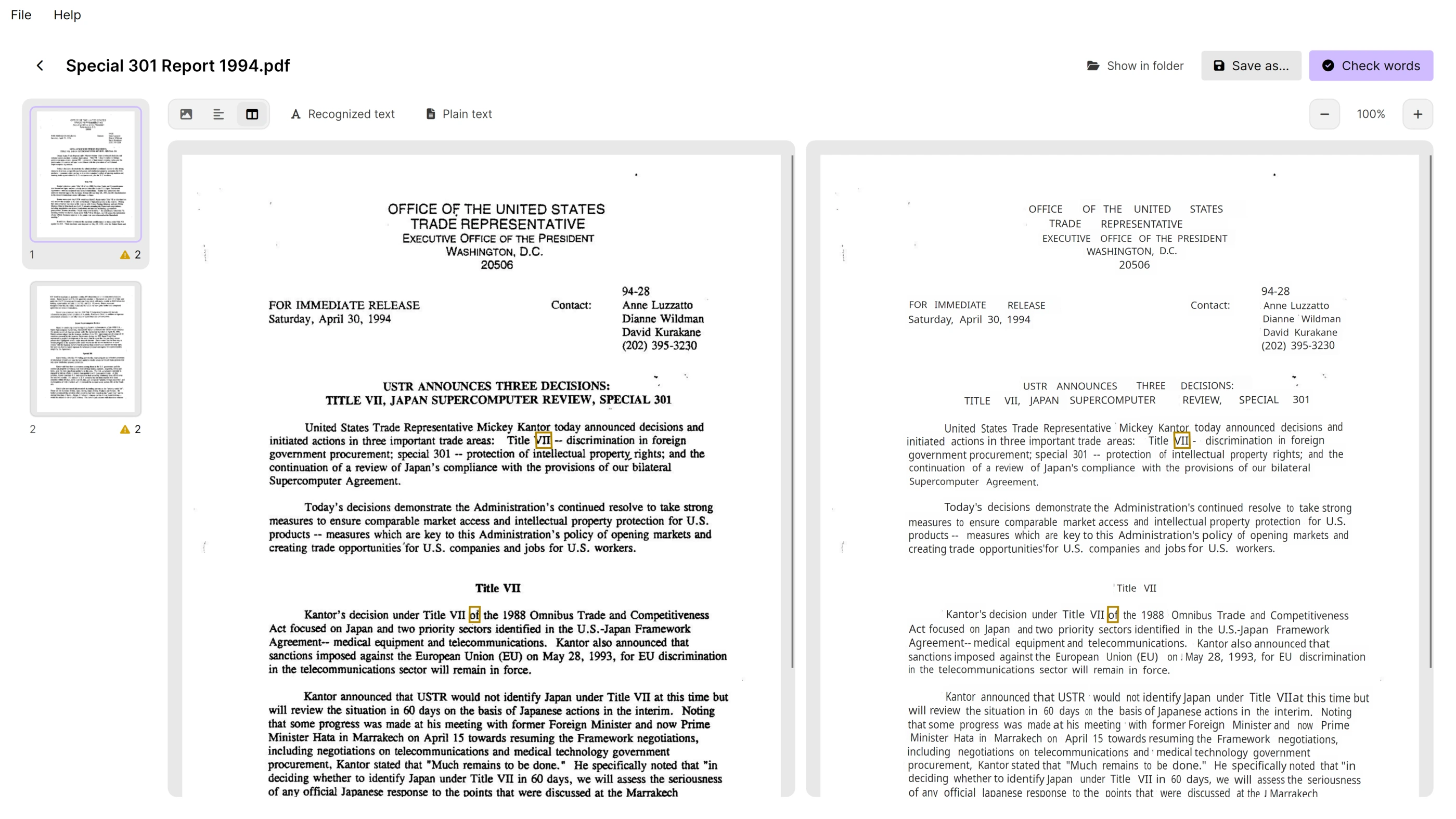
Switch to the Text view to read the recognized text on its own, or show both panes scrolling together. Copy the page's text with a single shortcut.

The same page shown twice side by side: the scan on the left and the recognized text on the right, with matching words outlined in both.

Scan paper straight in.

Free

Choose a scanner on this machine or on the network (WIA, TWAIN, SANE or eSCL), then flatbed or feeder, both sides, colour, resolution and paper size. Blank pages are skipped and pages straightened; each scanner remembers its settings, and the scan lands in the queue. On Linux, USB scanners need SANE.

A searchable PDF beside every original.

All plans

The output keeps your PDF's pages and adds an invisible text layer; images become PDFs with the scan underneath. Free output carries a small footer; Personal and Business write clean files.

Tables to Excel, letters to Word.

Personal

Beside the searchable PDF, Inklight can write a Word document with the headings, paragraphs, lists and tables it recognized, an Excel workbook with a worksheet per table, or Markdown, after every file or from Save as… on a document's page. They are editable, not pixel-identical to the scan. Plain text comes with every plan.

Your hardware, your pace.

Free

Recognition runs on the CPU or on a graphics card through Vulkan or Direct3D. Inklight measures your machine and suggests the preset it can sustain.

Decide where the files go.

All plans

Every plan writes searchable PDFs beside the originals or into one folder, with a name pattern of your choice. Business adds hot folders, each with its own output placement, including folder pairs that put every PDF in a separate folder under the original's name.

One case file, one PDF.

Free

Select single-page scans or photos in the queue and combine them into one searchable PDF, in queue order. The originals stay untouched, and each page shows the file it came from.

Put the pages in order.

Free

Turn a page, delete it, drag it to another place or split the file in two, right in the page strip. The searchable PDF and its exports are rewritten at once, without recognizing again, and a turn, delete or move can be undone.

Know before you file.

Free

A searchable PDF larger than your court's limit shows a size warning: 35 MB for US federal courts, 200 MB for beA. One carrying JavaScript, embedded files, encryption or form fields is marked Not filing-safe. Nothing is ever stripped, so the original's pages, fonts and signatures stay as they are.

Small PDFs from photos.

Free

Image quality Smaller keeps PDFs from photos and scanned images small: colour and grey pages as JPEG, black-and-white pages compressed losslessly, still PDF/A with Archival PDF. PDFs always keep their own pages.

Replace the original.

Personal

For a document system that expects one file per document, the searchable PDF takes the original's place and name. It is written beside and renamed over, so a crash never leaves you without either file.

Convert from scripts and other programs.

Business

inklight scan.pdf scan_ocr.pdf runs one conversion without opening the window, with the app's licence and preset, and exit codes a script or another program's OCR hook can act on.

Files named after their matter number.

Business

Put {matter} or {aktenzeichen} in a name pattern and each output is named after the first matter number (12-345) or German court file number (1234/24 becomes 1234_24) on its first page; empty when none is found.

Three steps from paper to searchable PDF

No account, no upload, no waiting for a server.

  1. Drop your scans

    Drag PDFs or TIFF, PNG, JPEG, WebP, BMP, GIF, HEIC, AVIF and JPEG XL images onto the window, pick them from a folder, or scan paper straight from your scanner. Each file becomes a Job in the Processing Queue.

  2. Recognized on your machine

    Inklight runs its recognition models locally, on the CPU or on your graphics card, and picks a preset that suits your hardware. Models download once on first use.

  3. Use the result

    A searchable PDF appears beside each original. Open a document to read the text, correct a word in place, or step through everything worth a second look in the Check pass.

Who uses Inklight

The same workflow fits very different documents.

  • Offices and back-office paperwork

    Invoices, contracts and incoming mail become PDFs you can search by content. Bank statements, invoices and price lists go on to Excel, a worksheet per table, without sending a single page to a cloud service.

  • Archives and research

    Old typewritten reports and faded scans are recognized where they are; the uncertain words are outlined instead of silently guessed.

  • Home paperwork

    Letters, statements and receipts, scanned once and searchable for years, on the Free plan or with a Personal licence.

Searchable PDFs for…

Each guide covers one job, on Windows and Linux.

All guides

Nothing leaves your computer

Inklight recognizes, checks and writes your documents on your machine. There is no account, no upload step and no processing server.

  • Your documents stay on your device

    Scans and PDFs are decoded and recognized locally. The searchable PDF is written beside the original or into the folder you choose.

  • Models are downloaded once

    Recognition models are fetched on first use and then reused offline.

  • The network is for updates and licences

    Downloading a model, checking your licence, looking for updates and error reporting are the times Inklight reaches the network. Document contents are never part of it.

  • Error reports leave the text out

    A problem report contains app and system details and recent log entries. Document contents and recognized text are not included, and you can edit the report before sending it.

Buy once, use forever.

Free

Free forever

Recognition and the Check pass without page or time limits.

  • Unlimited local recognition of PDFs and TIFF, PNG, JPEG, WebP, BMP, GIF, HEIC, AVIF and JPEG XL images
  • The Check pass, in-place corrections and find and replace
  • Searchable PDFs with a small Inklight footer on every page; beside them plain text (TXT) only
  • Rotate, delete, reorder and split pages
  • Output beside the original or in one folder
  • Scan from WIA, TWAIN, SANE and eSCL scanners, flatbed or feeder, both sides
  • Combine selected files into one searchable PDF
  • Court-filing checks: a size warning and a Not filing-safe marker
  • Image quality Smaller for PDFs from photos and scanned images
  • Drop blank pages, such as the empty backs of duplex scans
  • Seven-day Business trial on first start
Download Inklight

Personal

US$99 one-time

One user on up to three devices.

  • Everything in Free
  • All updates included
  • Searchable PDFs without the footer
  • Files still in the queue are rewritten clean when you buy
  • Replace the original: the searchable PDF takes the original's place and name
  • Exports to Word (.docx), Excel (.xlsx) and Markdown: editable, not pixel-identical
  • One user on up to three devices

Business

US$249 per seat

Per user, on up to three devices each.

  • Everything in Personal
  • All updates included
  • Hot folders recognize whatever a scanner or another program drops in while Inklight runs in the tray, and it can start at login
  • Each hot folder with its own output, including folder pairs that keep the original's file name
  • Keep, move or delete each original once its searchable PDF exists
  • The command line for scripts and other programs: inklight scan.pdf scan_ocr.pdf
  • Hot folders and the command line write the same Word, Excel, Markdown or text exports beside each searchable PDF
  • Name tokens for the matter or case number in output names
  • One seat per user, each on up to three devices

Prices include VAT where it applies; in the US and Canada, sales tax is added at checkout.

Questions worth answering first

Do my documents leave my computer?

No. Scans, PDFs and the recognized text stay on your machine. Inklight uses the network only to download models, check your licence, look for updates and send error reports, which never include document contents.

Which languages does it recognize?

Documents in Latin-script languages: English, German, French, Spanish, Italian, Dutch and more. For the Check pass, Inklight ships word lists for thirteen languages, so a correctly read word in those languages is not flagged just for being unusual.

What does “words to check” mean?

Inklight scores every recognized word. Words below its confidence threshold that no word list knows, numbers, words two readers disagreed on and IBANs with a failing checksum are outlined for you. Everything else is written without asking.

Do I need a graphics card?

No. Inklight runs on the CPU and uses a graphics card through Vulkan on Linux or Direct3D on Windows when one is available. It measures your machine on first start and suggests a preset; faster hardware mainly means faster pages.

Does it work offline?

Yes, once the recognition models have been downloaded. The first run needs a connection to fetch them.

Which files can I drop in?

PDF, TIFF including multi-page files, PNG, JPEG, WebP, BMP, GIF, HEIC, AVIF and JPEG XL. HEIC and AVIF need your system's decoder: on Windows, the HEVC Video Extensions (HEIC) or the AV1 Video Extension (AVIF) from the Microsoft Store; on Linux, a libheif that can decode HEVC or AV1. JPEG XL is built in, except on Windows on ARM. A PDF that already has text on every page is left alone; pages without text are recognized and the rest of the file is kept as it is.

Is a licence a subscription?

No. Personal and Business are perpetual licences bought once; the version you install keeps working for good. Every release is included. Each seat is for one user on up to three devices.

Which systems are supported?

Windows and Linux on x64, distributed through the Microsoft Store and as an AppImage.

Can I run Inklight from a script or another program?

Yes, with Business. Run inklight <file> <output.pdf> [--formats txt,md,docx,xlsx] [--force]; on Windows, use inklightc.exe from Inklight's install folder so the console shows its messages. The run uses the app's licence and preset, refuses to overwrite an existing file unless you add --force, and --formats also writes those exports beside the output; without it, the formats chosen under Preferences › Output › Also write are written. Exit codes: 0 done, 2 already searchable and copied unchanged, 3 failed, 4 needs Business, 5 bad arguments, 6 done but an export could not be written.

What does the Word export keep, and what not?

It keeps the text you need to work with, with your corrections: headings, paragraphs, lists and tables in reading order, and pictures as crops of the scan. It does not rebuild the page: columns, fonts, spacing and page breaks are not copied, and running headers and footers are left out, so the document is editable, not pixel-identical to the scan. Excel gets one worksheet per table with every cell as text. The searchable PDF is the file that keeps each page exactly as scanned.

Is the output safe to file with a court?

Inklight tells you. A searchable PDF larger than the court filing size limit in Preferences › Output shows a size warning; the default is 35 MB for US federal courts, and beA takes 200 MB. A PDF carrying JavaScript, embedded files, encryption or form fields is marked Not filing-safe, naming which. Inklight never strips anything, so the original's pages, fonts and signatures stay as they are; fix the file in your PDF editor before filing.

Try it on your own scans.

Install Inklight, drop a file, and search what is in it.