Paperless-ngx OCR on your desktop before consume
Run OCR in Inklight on Windows or Linux and let a hot folder hand each searchable PDF to the Paperless-ngx consume folder.
Published
Paperless-ngx runs its own OCR on every document it consumes. You can also do the OCR first, on your desktop, and give Paperless-ngx a PDF that is already searchable. Inklight does that with a hot folder: the scanner saves into one folder, Inklight writes a searchable PDF for each file into the Paperless-ngx consume folder, and Paperless-ngx takes it from there.
This way you choose the OCR engine that reads your documents, and a heavy batch runs on the desktop’s CPU or graphics card instead of the server. Hot folders are an Inklight Business feature; every install starts with a seven-day Business trial.
All Paperless-ngx details below come from its own documentation, fetched on 28 October 2026.
What Paperless-ngx does with the consume folder
The consumer watches the consumption directory, parses new files with OCR, indexes them and stores them in its media directory. Files are removed from the consumption directory once consumed, so the documentation calls it a temporary location (Paperless-ngx: the consumption directory). Getting files there is left to you; for a server, the docs suggest an FTP server or a Samba share.
Its path is PAPERLESS_CONSUMPTION_DIR. In Docker, change the consume volume in docker-compose.yml instead, because the variable only changes the path inside the container (PAPERLESS_CONSUMPTION_DIR).
With the default OCR mode, auto, Paperless-ngx checks whether a document already has embedded text and skips OCR when it finds enough (PAPERLESS_OCR_MODE). A PDF from Inklight has that text, so Paperless-ngx keeps Inklight’s text layer.
How it works in Inklight
- Share or mount the consume folder on the computer that runs Inklight, for example through the Samba share the Paperless-ngx docs mention.
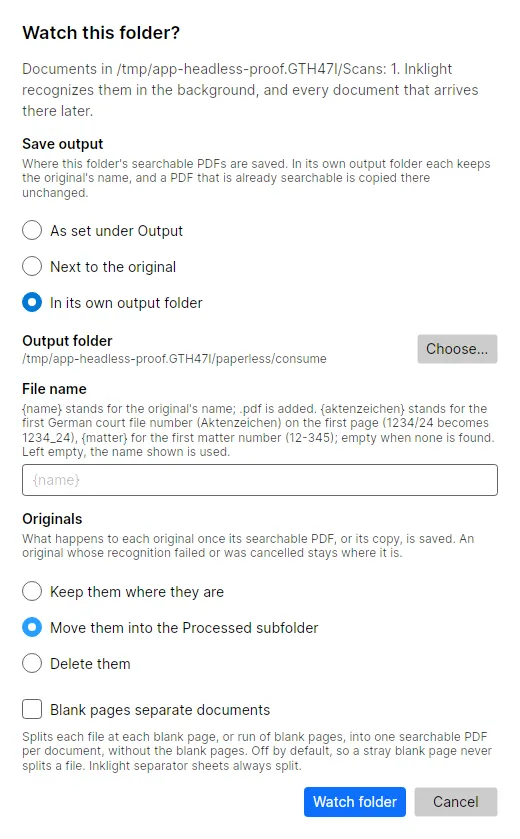
- In Inklight, open Preferences › Hot folders and click Add folder…. Pick the folder your scanner saves into; the dialog Watch this folder? opens.
- Under Save output, choose In its own output folder and pick the consume folder. This makes a Folder pair. Each searchable PDF keeps the original’s file name, and a PDF that is already searchable is copied there unchanged, so every file reaches Paperless-ngx.
- Under Originals, choose what happens to each scan once its PDF is written: keep it, move it into the
Processedsubfolder, or delete it. A Folder pair deletes by default and asks you first; Move keeps a copy until you trust the setup.
While a hot folder is watched, Inklight keeps running in the tray. Turn on Start Inklight at login under General, so the folder is watched again after a restart.
What you get
- One searchable PDF per original (Business), named like the original. Hot folders never write the Free footer. Without Business they pause.
- Stacks split into documents (Business). Turn on Blank pages separate documents for a folder, and a feeder stack with blank sheets between letters becomes one PDF per letter, so Paperless-ngx gets each as its own document.
- Local OCR (every plan). Recognition runs on the desktop, offline once the models are downloaded. Nothing goes to a cloud service.
- Checked text for documents you open yourself (every plan). Hot folder Jobs are convert-only and skip the Check pass. For a document that matters, drop it on the window, check its words, and copy the PDF into the consume folder by hand.
Limits
- Inklight runs on Windows and Linux, not macOS, and not as a server service. It watches the hot folder while it runs, in the tray or at login.
- Subfolders of a hot folder are not watched.
- Latin-script documents; no handwriting.
- Paperless-ngx starts on a file once it has stayed unchanged for a few seconds, 5 by default (PAPERLESS_CONSUMER_STABILITY_DELAY). Raise it if a slow network share hands over half-written files.
- Set
PAPERLESS_OCR_MODEtoredoorforceand Paperless-ngx runs OCR again and replaces Inklight’s text.
Related guides
Receipt OCR and bank statement OCR cover two common things to scan into Paperless-ngx. Paperless-ngx runs its own OCR through OCRmyPDF and Tesseract (configuration); Tesseract alternative compares that engine with Inklight.