Tesseract alternative: an OCR app instead of an engine
Tesseract is a free OCR engine run from the command line. Inklight is a desktop app you drop scans on, with a Check pass and a Business command line.
Published
Tesseract is an OCR engine. You give it an image on the command line and it writes text, or a PDF with a text layer. If you are looking for a Tesseract alternative, you probably want one of two things: a program with a window, where you drop scanned PDFs and get searchable PDFs back, or a way to see which words the engine got wrong. Inklight is that program for Windows and Linux. For scripts, its Business plan adds a command line.
We make Inklight. Every statement about Tesseract below links to its own documentation, fetched on 28 October 2026.
Tesseract and Inklight side by side
| Tesseract | Inklight | |
|---|---|---|
| What it is | An OCR engine and a command-line program, no GUI (README) | A desktop app, with a command line in Business |
| Price | Free and open source, Apache 2.0 (README) | Free; Personal US$99 once, Business US$249 per seat once |
| PDF input | Not supported (input formats) | Yes; pages that already have text are kept |
| HEIC, AVIF, JPEG XL | Not supported (input formats) | Yes; HEIC and AVIF through the system decoder |
| Languages | More than 100 (README) | Latin-script print |
| Reviewing doubtful words | Word confidences in hOCR output (command-line usage) | Check pass |
Engine versus application
Tesseract contains the engine, libtesseract, and the tesseract command. The project “does not include a GUI application” and points to third-party front ends (README). It reads images such as PNG, JPEG and TIFF, but not PDF files; for PDFs, the documentation suggests converting them first or using OCRmyPDF (input formats). Tesseract works best on images of 300 dpi or more, and when its own preprocessing falls short, deskewing, binarisation and border removal are up to you (improving quality).
Inklight is the whole application around recognition. It takes PDFs and images, recognizes them on the CPU or on a graphics card (Vulkan on Linux, Direct3D on Windows), and writes a searchable PDF beside each original. A PDF page that already has text is kept as it is. The recognition models download once, and then recognition runs offline.
Command line versus drop-and-check
With Tesseract, a searchable PDF comes from a command such as tesseract page.png page -l eng pdf, and English is assumed unless you pass -l (command-line usage). Linux distributions package the engine and each language separately, and on Windows the project points to installers built at UB Mannheim (installation).
Tesseract does compute how sure it is. Its hOCR output carries a confidence for every word (command-line usage), but with no GUI of its own (README) it has nowhere to show you the doubtful ones. Inklight’s Check pass does.
How it works in Inklight
You drag a folder of scans onto the window. Each file becomes a Job in the Processing Queue, the cards count the words left to check, and the header adds them up.
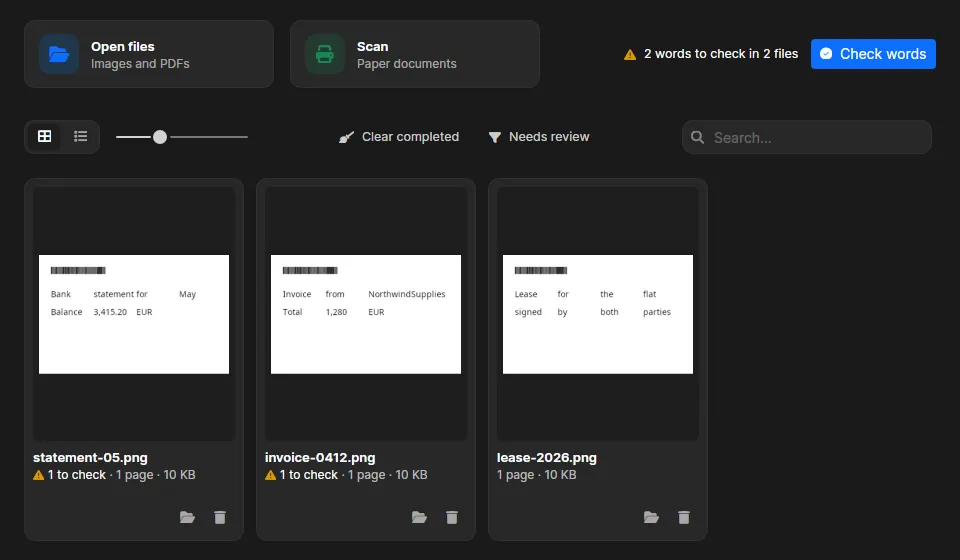
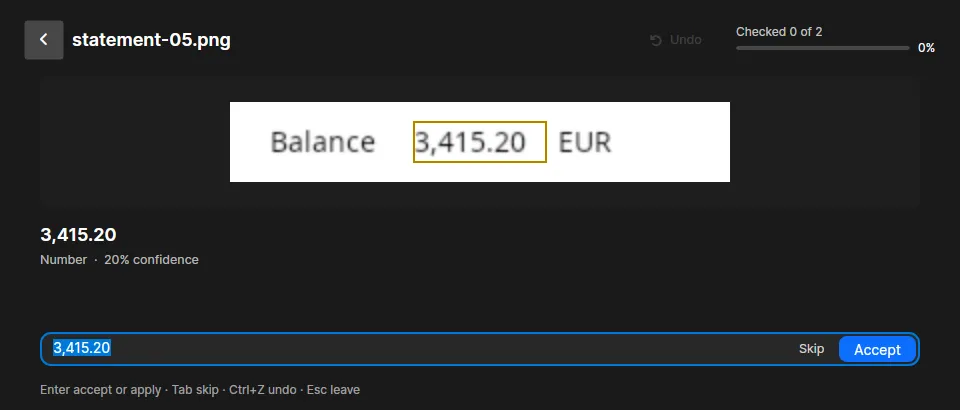
Check words steps through the doubtful words of every finished file, worst first: words below the confidence threshold that no word list knows, numbers, words two readers disagreed on, and IBANs whose checksum fails. You accept or correct each one with a keystroke, and the searchable PDF is rewritten.
A command line for scripts, in Business
If you used Tesseract in scripts, Inklight Business keeps that option. inklight scan.pdf scan_ocr.pdf runs one conversion without opening the window, with the app’s licence and recognition preset, and returns exit codes a script can act on. --formats docx,xlsx,md,txt writes exports beside the PDF. Business also adds hot folders, which recognize whatever a scanner or another program drops in while Inklight runs in the tray.
What you get
- Searchable PDFs from PDF, TIFF, PNG, JPEG, WebP, BMP, GIF, HEIC, AVIF and JPEG XL (every plan; Free adds a footer)
- The Check pass, corrections on the page and find and replace (every plan)
- Scanning from WIA, TWAIN, SANE and eSCL scanners (every plan)
- Plain text beside the searchable PDF (every plan)
- Exports to Word, Excel and Markdown, editable, not pixel-identical (Personal)
- The command line, hot folders and name tokens for case numbers (Business)
Limits
Tesseract recognizes more than 100 languages and can be trained on new ones (README). Inklight reads Latin-script print only, with English, German, French, Spanish, Italian and Dutch as the tested languages. It reads no handwriting, Cyrillic, Arabic or CJK. Tesseract is free and runs on macOS too (installation); Inklight runs on Windows and Linux only, and its command line costs US$249 per seat. Inklight has no library or API for developers. If you are building OCR into your own software, Tesseract is the right tool.
Other comparisons
- NAPS2 alternative: a free scanner app that runs Tesseract when it saves a PDF.
- ABBYY FineReader alternative: a subscription suite against a one-time licence.
- Best OCR software for searchable PDFs: eight tools compared, including OCRmyPDF and gImageReader on top of Tesseract.