ABBYY FineReader alternative: buy once, run on Linux
FineReader PDF is a subscription for Windows and macOS. Inklight is a one-time licence for Windows and Linux. Where each one wins, from ABBYY's own pages.
Published
If you are looking for an ABBYY FineReader alternative, the reason is usually one of three: the yearly fee, the missing Linux version, or a suite that does far more than you need when all you want is searchable PDFs. Inklight is a desktop app for Windows and Linux that turns scans and PDFs into searchable PDFs on your own machine, bought once. It reads fewer languages than FineReader and it does not edit PDFs, so it replaces FineReader only when making scans searchable is the job.
We make Inklight. Every statement about FineReader below links to ABBYY’s own documentation, fetched on 28 October 2026.
FineReader and Inklight side by side
| ABBYY FineReader PDF | Inklight | |
|---|---|---|
| Price | From €99 a year or €16 a month (pricing) | Free; Personal US$99 once, Business US$249 per seat once |
| Platforms | Windows 10 and 11 (specification), macOS 12 or later (Mac specification) | Windows and Linux, x64 |
| Recognition languages | 198 (specification) | Latin-script print; English, German, French, Spanish, Italian and Dutch tested |
| Where documents are processed | Locally (ABBYY support) | Locally |
| Reviewing doubtful words | Verification dialog in the OCR Editor (help) | Check pass across every finished file |
Subscription versus one-time licence
ABBYY sells FineReader PDF by subscription. Standard costs €99 a year, €267 for three years or €16 a month; Corporate, which adds document comparison and Hot Folder, costs €165 a year; the Mac edition costs €69 a year. Corporate’s Hot Folder is capped at 5,000 pages a month, and the subscription renews automatically (pricing page).
Inklight’s paid licences are perpetual. Personal is US$99 once for one user on up to three devices. Business is US$249 per seat, one user on up to three devices each. Both include every update. The Free plan has no page or time limit and writes a small Inklight footer on every page.
Windows and Linux versus Windows and macOS
FineReader PDF 16 runs on 64-bit Windows 10 and 11 (specification), and FineReader PDF for Mac on macOS 12 or later (Mac specification). ABBYY’s pricing page lists no Linux edition.
Inklight runs on Windows, from the Microsoft Store, and on Linux, as an AppImage. There is no macOS version. If your office is on Macs, FineReader is the better fit.
Recognizing 198 languages versus Latin-script print
FineReader recognizes 198 languages in any combination, 53 of them with dictionary support. The list includes Chinese, Japanese, Korean, Arabic, Hebrew, Greek and Russian (specification).
Inklight reads Latin-script print. English, German, French, Spanish, Italian and Dutch are the tested languages, and word lists ship for 13 European languages. It does not read handwriting, Cyrillic, Arabic or CJK. If you scan documents in those scripts, stay with FineReader.
How it works in Inklight
You drop scans or PDFs onto the window. Each file becomes a Job in the Processing Queue and is recognized in the background, and a searchable PDF appears beside the original under the same name plus _ocr. Recognition runs on the CPU or on a graphics card, Vulkan on Linux and Direct3D on Windows.
FineReader has a review step too. In its OCR Editor, low-confidence characters are highlighted in the Text pane, and the Verification dialog steps through words that contain them, with suggestions and a user dictionary (help page).
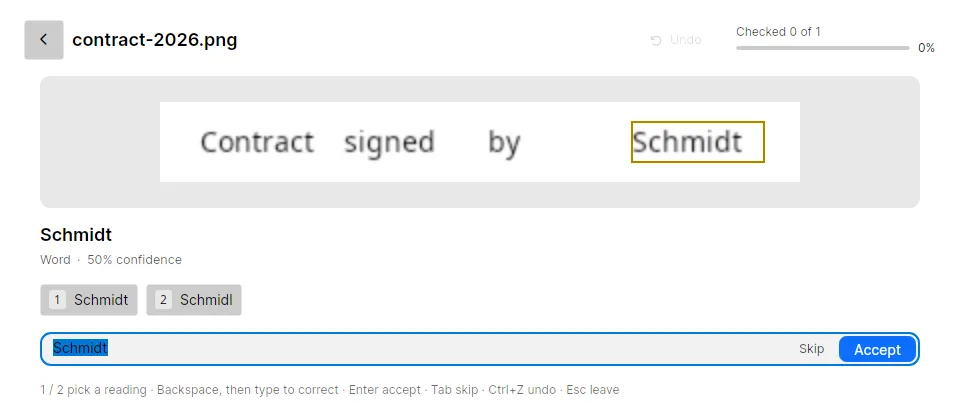
Inklight’s Check pass is that step for the whole queue. Check words collects the doubtful words from every finished file, worst first: words below the confidence threshold that no word list knows, numbers, words two readers disagreed on, and IBANs whose checksum fails. You accept or correct each one with a keystroke, and the searchable PDF is rewritten with your decisions.
When two readers disagree, the Check pass offers both readings, and 1 or 2 picks one.
What you get
- Searchable PDFs from PDF, TIFF, PNG, JPEG, WebP, BMP, GIF, HEIC, AVIF and JPEG XL, beside the original or in one folder (every plan; Free adds a footer)
- The Check pass, corrections on the page and find and replace (every plan)
- Scanning from WIA, TWAIN, SANE and eSCL scanners, flatbed or feeder, both sides (every plan)
- Combine several files into one searchable PDF (every plan)
- Exports to Word, Excel and Markdown, editable, not pixel-identical (Personal)
- Replace the original with its searchable PDF (Personal)
- Hot folders that recognize whatever a scanner drops in, and a command line for scripts (Business)
Limits
Inklight is not a PDF editor. FineReader edits text inside PDFs, creates forms, signs and compares documents (pricing page); Inklight adds a text layer and lets you turn, delete, reorder and split pages. It reads no handwriting and no non-Latin script, and there is no macOS version. It needs the internet once to download its recognition models, and later only for licence checks, updates and error reports.
Other comparisons
- NAPS2 alternative: a free scanner app with OCR as a save option, against an OCR app with scanning built in.
- Tesseract alternative: the open-source engine on the command line, against an app you drop files on.
- Best OCR software for searchable PDFs: eight tools, including FineReader, compared.