NAPS2 alternative: OCR first, with scanning built in
NAPS2 is a free scanner app that adds Tesseract OCR when you save. Inklight is an OCR app with a scanner dialog and a Check pass. How they differ.
Published
NAPS2 and Inklight both scan paper, both write searchable PDFs, and both are free to start. NAPS2 is a scanning program where OCR is a save option. Inklight is an OCR program with a Scan dialog built in, and it shows you the words it is unsure about before you rely on the text. If you are looking for a NAPS2 alternative because you scan to get searchable text, that difference is the one to weigh.
We make Inklight. Every statement about NAPS2 below links to its own documentation, fetched on 28 October 2026.
NAPS2 and Inklight side by side
| NAPS2 | Inklight | |
|---|---|---|
| Built for | Scanning and organizing pages (README) | Recognizing scans and PDFs |
| Price | Free and open source, GPL 2.0 (README) | Free; Personal US$99 once, Business US$249 per seat once |
| Platforms | Windows, macOS and Linux, x64 and arm64 (README) | Windows and Linux, x64 |
| Scanner drivers | WIA, TWAIN, SANE, eSCL (README) | WIA, TWAIN, SANE, eSCL |
| OCR engine | Tesseract (OCR documentation) | Recognition models downloaded once, run on the CPU or a graphics card |
| Reviewing doubtful words | No review step in its OCR documentation (OCR documentation) | Check pass |
A scanner app with OCR, or an OCR app with a scanner
NAPS2 scans from WIA, TWAIN, SANE and eSCL scanners, lets you arrange the pages and saves them as PDF, TIFF, JPEG or PNG (README). It can also share a scanner across the local network (home page). OCR comes in at the end: with “Make PDFs searchable using OCR” ticked, every PDF you save gets a text layer. On imported PDFs, pages that already have text are left alone (OCR documentation).
In Inklight, OCR comes first. Every file you drop or scan becomes a Job in the Processing Queue and is recognized in the background, with no save option to tick. The searchable PDF appears beside the original under the same name plus _ocr.
Tesseract versus the Check pass
NAPS2 uses the Tesseract engine. Language packs download inside the app, there is a Fast mode and a slower Best mode, and the documentation suggests Best when Fast is not good enough (OCR documentation). The result goes straight into the PDF. NAPS2 cannot save OCR results to a text file directly, and editing pages after an early OCR run makes it run again when you save (OCR documentation).
Inklight writes the text layer too, then outlines the words it doubts so you can decide them before you rely on the file.
How it works in Inklight
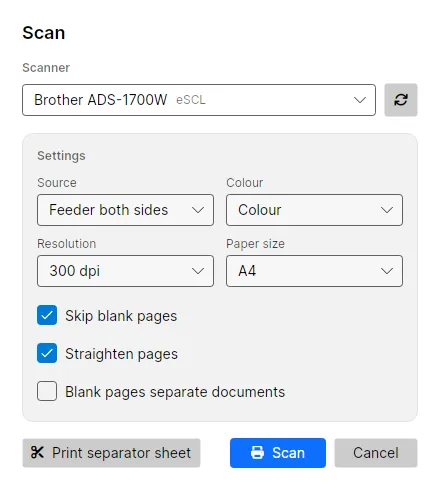
File › Scan… or the queue’s Scan card opens the Scan dialog. Pick a scanner on this machine or on the network, flatbed or feeder, both sides, colour, 200 to 600 dpi and paper size. By default Inklight skips blank pages and straightens the rest, and each scanner remembers its settings. The pages land in the queue as one file and come out as a searchable PDF.
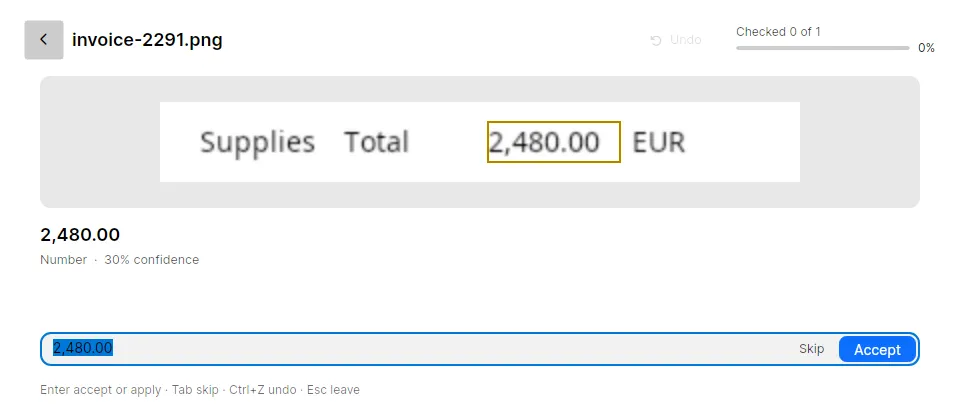
Check words then collects the doubtful words from every finished file, worst first: words below the confidence threshold that no word list knows, numbers, words two readers disagreed on, and IBANs whose checksum fails. You accept or correct each one with a keystroke, and the searchable PDF is rewritten with your decisions. A misread total is fixed before anyone searches for it.
Both free to start
NAPS2 is free with no paid tier (home page). Inklight’s Free plan has no page or time limit and includes scanning and the Check pass, but writes a small Inklight footer on every page. Personal, US$99 once, writes clean files and adds Word, Excel and Markdown exports. Every install starts with a seven-day Business trial.
What you get
- Scanning from WIA, TWAIN, SANE and eSCL scanners, flatbed or feeder, both sides, with blank pages dropped (every plan)
- Searchable PDFs from scans, PDFs and images, including HEIC and JPEG XL (every plan; Free adds a footer)
- The Check pass, corrections on the page and find and replace (every plan)
- Plain text beside the searchable PDF (every plan)
- Exports to Word, Excel and Markdown, editable, not pixel-identical (Personal)
- Hot folders that recognize whatever a scanner or another program drops in, and a command line (Business)
Limits
NAPS2 does more as a scanning tool. It runs on macOS and on ARM machines (README), lets you crop pages and change brightness and contrast (home page), and its command line is free (command-line documentation). It offers OCR in over 100 languages (home page).
Inklight has no macOS version and ships for x64 only, and its command line is a Business feature. It reads Latin-script print only, with no handwriting, Cyrillic, Arabic or CJK. On Linux, USB scanners need SANE; network scanners work without it.
Other comparisons
- Tesseract alternative: the engine NAPS2 uses, on its own, against an app you drop files on.
- ABBYY FineReader alternative: a subscription suite against a one-time licence.
- Best OCR software for searchable PDFs: eight tools, including NAPS2, compared.